Showing posts with label operating system. Show all posts

Tuesday, February 12, 2008

Make My Desktop more fancy

I use fedora core 7 with Gnome and Beryl as the desktop management. To make my Beryl Desktop more fancy, I installed Mac4Lin Emerald Theme. This theme really make me more exciting to use Linux Desktop as my operating system in my notebook. To make my Linux Desktop to become most like a Tiger Mac X OS, I installed Avant Window Navigator too. With Avant, I have a fancy launch pad like Mac X OS in my Desktop. Very impressive.

In another thing, in my Linux box, I have installed VMWare Player that playing M$ Windows XP Home Edition (provided by compaq presario V1000 bundled) with SP2 for me. (I have tried VirtualBox to play Fedora Core 8). For my virtual M$ Windows, I want to make the desktop more like Fedora too, so I installed Fedora Transformation Packet. I think this theme is very impressive for my windows.

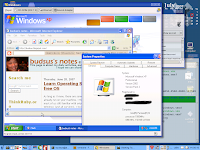
Here is the example of my desktop with Mac4Lin and Avant :

Monday, August 06, 2007

System 7 Simulation

If you want to look and try an old Mac Operating System, i.e. System 7, you can visit WebSE. This simulation is very good. They create it using Flash. Very Interactive. You have to try it.

Sunday, August 05, 2007

Fixing vmware-config on FC7

I just want to share about vmware-config (vmware player) error fixing when I tried to run it on my FC7 with kernel 2.6.22.1-41. This discussion is very helpful for me. I just want to rewrite again in my blog, so if I forget about this, I can just visit this my note.
  • download the patch from here.
  • follow these instructions :
    • cd /usr/lib/vmware/modules/source
    • cp vmnet.tar vmnet.tar.orig
    • tar xvpf vmnet.tar
    • zcat yourdownloaddir/patch-vmnet-for-linux-2.6.22.1.gz | patch -p4
    • rm vmnet.tar; tar cvf vmnet.tar vmnet-only
  • run /usr/bin/vmware-config.pl again. Now, I can configure my vmware network modul on vmware player clearly.
It's good thing that vmware-player can run very well on my FC7. Thanks.

Saturday, July 07, 2007

Windows XP Pro on VMWare Player

I tried to install VMWare Player on my FC6 with kernel 2.6.20-1.2962.fc6. After I regitered, I downloaded the file, and installed with this command :

rpm -ivh VMware-player-2.0.0-45731.i386.rpm

after that, I tried to run vmware-config.pl as root. But I got some big errors. Based on those errors, I have to install kernel source development. The important think to install kernel source is the compatibility of machine should be same with the kernel. You can query with rpm command like this :

rpm -qa --queryformat "%{NAME}-%{VERSION}-%{RELEASE}.%{ARCH}\n" | grep kernel

I got the package name of kernel : kernel-2.6.20-1.2962.fc6.i586. With this information, I should download kernel-devel-2.6.20-1.2962.fc6.i586. After this installation, I can run vmware-config.pl successfully.

After this installation, I have tried to run minix and haiku with VMWare Player. You can download those vmdk and vmx from Virtual Appliance (http://www.vmware.com/info?id=177).

To get more experiences for using VMWare player, I tried to install Windows XP Prof SP2 in VMWare Player too. These sites are very helpfull for me : http://www.ffnn.nl/pages/articles/linux/vmware-player-image-creation.php. I use image file 20 GB (store at my ntfs partition) and modify template-windows.vmx (is saved on my ext3 home) like this:

#!/usr/bin/vmware
displayName = "Windows"
guestOS = "winxppro"

memsize = "192"
ide0:0.fileName = "/media/BUDSUSOTHIE/winXPSP2/20GB.vmdk"
ide1:0.fileName = "auto detect"

# DEFAULT SETTINGS UNDER THIS LINE
config.version = "8"
virtualHW.version = "3"

MemAllowAutoScaleDown = "FALSE"
MemTrimRate = "-1"

uuid.location = "56 4d 07 13 a0 34 45 9d-d8 48 18 f5 99 4b 9a ef"
uuid.bios = "56 4d 07 13 a0 34 45 9d-d8 48 18 f5 99 4b 9a ef"

uuid.action = "create"
checkpoint.vmState = ""

ethernet0.present = "TRUE"
ethernet0.connectionType = "nat"
ethernet0.addressType = "generated"
ethernet0.generatedAddress = "00:0c:29:4b:9a:ef"
ethernet0.generatedAddressOffset = "0"

usb.present = "FALSE"
sound.present = "TRUE"
sound.virtualDev = "es1371"

scsi0.present = "FALSE"
scsi0:0.present = "FALSE"
scsi0:1.present = "FALSE"

floppy0.present = "FALSE"

ide0:1.present = "FALSE"
ide1:1.present = "FALSE"

ide0:0.present = "TRUE"
ide0:0.deviceType = "disk"
ide0:0.startConnected = "TRUE"

ide1:0.present = "TRUE"
ide1:0.deviceType = "cdrom-raw"
ide1:0.autodetect = "TRUE"
ide1:0.startConnected = "TRUE"

ide0:0.redo = ""

extendedConfigFile = "template-windows.vmxf"
virtualHW.productCompatibility = "hosted"
tools.upgrade.policy = "manual"

isolation.tools.hgfs.disable = "TRUE"

usb.autoConnect.device0 = ""

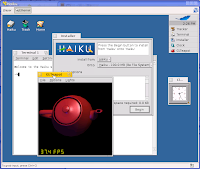
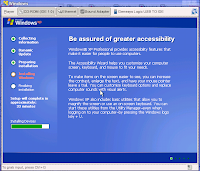
Here are some snapshot of my vmware player window for Windows XP setup and Haiku :
I've tried to run ReactOS image with QEMU. Here are some "little" steps that I do :
  • run echo 1024 > /proc/sys/dev/rtc/max-user-freq as root
  • in my machine, qemu was told me to have 256 MB minimum for /dev/shm, because i have only 248 MB. QEMU told me to do this:
    • umount /dev/shm
    • mount -t tmpfs -o size=272m none /dev/shm
  • run qemu with this command:
qemu -serial stdio -boot c -hda /media/BUDSUSOTHIE/ReactOS-0.3.1/ReactOS-0.3.1.img -m 256 -localtime

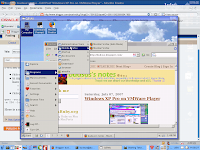
Here is a snapshot for running ReactOS under QEMU :
This is one of good tutorial about VMware Player.

Thursday, June 28, 2007

Operating System Study from free OS

As long as I know, there are some famous operating system that already run on your machine. I think from all those operating system most of us still familiar with only about one or three of theme, i.e. MS Windows (and all versions), Linux (and all ditros), Mac X OS (and all versions), BSD and Unix. Sometime when we was asked to choose one of those operating system, most of us will make decision to choose an easiest and most popular operating system, although we should buy it. Some of us have a argument to choose free and open source operating system. Actually, I prefer to open source operating system, because with those open source OS we can deploy and make modification to meet our requirements. But, how about if we be bored by those famous operating system? When I tried to search from Sourceforge.net with keyword (+"Operating System"), I found some interested another free operating system. If you want not to install those alternative free operating system, you can use QEMU to run it. I have tried to run ReactOS (Windows like) on QEMU, although was ran slowly.
Based on those fact, I am wondering about how to use those alternative free and opensource operating system for use Operating System subject in undergraduate program. It will make more interesting subject if we can teach students about operating system design and algorithm based on those alternative OS as case study.
Here are some alternative free OS that I have found :
  • ReactOS. This is a Windows OS like. I use it on my FC 6 with QEMU. "ReactOS aims to achieve complete binary compatibility with both applications and device drivers meant for NT and XP operating systems, by using a similar architecture and providing a complete and equivalent public interface."
  • Haiku. If you want to know about BeOS, you can to run this operating system. If you want to run it on VMWare Player, you can download the Haiku test image that already provide at their site.
  • eyeOS. This is a Web based operating system. Very interesting for all of you which want to learn about operating system design. eyeOS using AJAX technology, so you can develop any AJAX application on it.
  • Syllable. This operating system is a AtheOS clone. "The goal of Syllable is to create a reliable and easy-to-use open source operating system for the home and small office user."
  • AROS. This OS is developed to achieve compatibility with AmigoOS.
  • TinyOS. If you want to develop an embedded wireless sensor device, this open source OS may be can help you.
  • Contiki. This is another opensource OS that was developed for embedded device. "Contiki is designed for embedded systems with small amounts of memory. A typical Contiki configuration is 2 kilobytes of RAM and 40 kilobytes of ROM."
  • MenuetOS. This operating system can only be ran only at x86 machine, either 32 bit or 64 bit. Nevertheless, this OS is very light.